Embroidery Kit Icons, Outline Style: Real Use Review
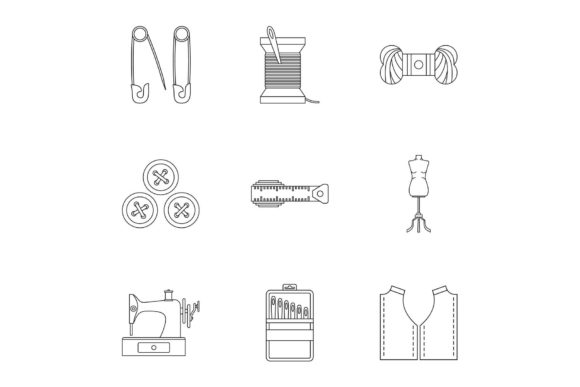
As a designer who regularly digitizes and sews out custom machine embroidery designs, I approached the Embroidery Kit Icons Set, Outline Style with a specific question: does this graphics set translate well from a digital vector file into a stitched, tactile finished product? Icons are tricky. Too much detail and they become a thread soup. Too simple and they look like an afterthought. This set, with its nine distinct outline icons representing embroidery tools and motifs, landed on my desk right as I was planning a new line of custom tote bags and handmade gift sets for the upcoming holiday season. Let me break down exactly how this design asset performs under the needle.
A Modern Take on Classic Craft Motifs
The first thing you notice is the clean, modern outline style. This isn't a vintage or heavily detailed illustration. It's crisp, approachable, and feels very contemporary. The icons – a needle, thread spool, hoop, scissors, thimble, and other embroidery kit staples – are instantly recognizable. The uniform stroke weight gives the entire collection a cohesive brand feel. This design naturally belongs on products that celebrate the craft itself. It's perfect for a crafter's tote bag design, a sewing studio apron, or a personalized gift for a fellow embroidery enthusiast. The outline style lends itself beautifully to a single-color stitch-out, which is a huge advantage for keeping production costs low and turnaround times fast for any small shop product.
From Vector File to Stitch: The Digitizing Reality
I need to be completely straightforward about the file formats. The product listing specifies JPG, EPS, AI, PSD, and PNG. These are standard vector and raster graphic formats. They are not native machine-ready embroidery files (like .DST, .PES, or .EXP). This is a crucial point if you are an Etsy seller or craft business owner expecting to load this directly onto your machine. Using this set requires a digitizing step, and you should factor that into your workflow.
You will need to import the vector file (AI or EPS is best) into your digitizing software to convert the outlines into stitches. The good news is that the clean, open lines of these icons make them excellent candidates for digitizing. The lack of heavy fills means you can run them as a simple satin stitch or a narrow running stitch. I tested converting the "scissors" and "thread spool" icons. The open paths digitized cleanly, requiring minimal manual editing. The thread spool, with its distinct sections, allowed for a couple of thread color changes to really make it pop, but it looks equally strong in a single solid color against a contrasting fabric. This is a well-constructed vector set that respects the limitations and strengths of commercial embroidery.
Real-World Test: The Canvas Tote Bag Project
Let's get specific. I decided to use the "hoop" and "needle" icons for a line of premium canvas tote bags aimed at craft fair attendees.
- Hoop Size: I kept the embroidery project to a 4x4 inch hoop. The outlines were thick enough to digitize as a 4mm satin stitch without becoming too chunky.
- Fabric Texture: Canvas is forgiving. It's stable, doesn't stretch, and holds stitch density well. The outline style worked perfectly on this fabric texture.
- Thread Colors: I used a bright mustard yellow thread on a natural unbleached canvas. The contrast was sharp, giving the bag a high-end, hand-boutique feel.
- Customer Reaction: The clean, modern look of the outline icon was a hit. It didn't scream "homemade" in a bad way. It looked intentional and designed. Customers specifically commented on the "modern embroidery" look. This is the power of a well-designed icon set used as a digital embroidery file after proper digitizing.
Where to Thread Carefully: Fabric and Placement Notes
Not every surface is ideal for this design. Here are a few scenarios where you should exercise caution before stitching out your finished product.
Dark and Dense Fabrics
An outline icon relies entirely on contrast. On a black sweatshirt, a white thread will pop, but the interior negative space of the icon (like the inside of the hoop) will be invisible. Consider using a fill stitch for the main body of the icon or ensuring the outline is thick enough to stand out. For sweatshirt embroidery, I recommend testing the design on a scrap piece of the same fabric first.
Stretchy or Textured Surfaces
Fleece, ribbed knits, or thick terry cloth can distort a thin outline. A satin stitch outline can get lost in the nap of the fabric. If you are planning baby embroidery on a onesie or a holiday embroidery project on a plush towel, use a high-quality stabilizer with strong adhesive properties. A cut-away stabilizer is non-negotiable here to prevent the stitches from puckering over time.
Small Hoop Sizes and Intricate Details
The nine-icon set is designed for web and print graphics. For a 4x4 hoop, you will likely want to use just one icon, or a very small combination of two. Trying to cram all nine into a small space will result in tiny, unrecognizable details. This is a design asset that needs to be scaled appropriately for the hoop. Also, be mindful of curved surfaces like caps. The long, uninterrupted satin stitches on the outlines can be tricky to lay down smoothly on a curved cap surface without proper stabilization.
High-Wash Items
For items like kitchen towels, baby bibs, or frequently washed custom apparel, the longer satin stitches can be vulnerable to snagging. A tight running stitch or a very dense satin stitch is safer for these applications. I would recommend a high-quality polyester thread to maintain color and integrity.
Business Value for Etsy Sellers and Small Shops
For Etsy sellers and craft business owners, this set is a versatile asset if you have the digitizing skills or software. Because it's an outline style, it reads well in product photography. You can create a printable mockup using the provided PNG or PSD files, list the product, and only stitch it once an order comes in. The "Embroidery Kit" theme is universally understood and perfectly evergreen. It works for:
- Gifts for sewing enthusiasts.
- Branding for a fabric or yarn shop.
- Creating an embroidered patch for a sewing club.
- Aprons for a craft cafe.
- Boutique branding for a handmade product line.
The commercial viability is high because the design is not tied to a specific holiday or trend. It feels like a professional, boutique graphic, which elevates the perceived value of your finished product. Customers trust a brand that looks cohesive and modern, and this icon set helps you achieve that consistency.
My Practical Checklist Before You Buy
Before you download this set and start cutting stabilizer, here are a few actionable notes from my workstation:
- Digitizing is required: Remember, this is a graphics set, not a machine-ready embroidery file. You will need to digitize it. Factor this into your production time and cost.
- Test on scrap fabric: Before you run a batch of 50 tote bags, stitch one out. Check the tension. Look at the curves. Does the needle icon look like a needle, or a blob? The vector file is clean, so the result depends on your digitizing settings.
- Thread contrast is essential: This is an outline set. It needs a high-contrast thread to be visible. Light thread on a dark fabric, or dark thread on a light fabric. Metallic threads could also look incredible for the scissors or needle icon.
- Check stitch density: When digitizing, pay attention to the stitch density. You want the outline to be solid but not so dense that it puckers the fabric. A satin stitch with a density of around 0.4mm is a good starting point for these shapes.
- Review licensing: The product page includes standard graphic formats. Check the specific license terms before selling finished products or using the vector in commercial digital products. Most standard graphics licenses allow for selling finished handmade products, but do not allow reselling the digital file itself.
The Embroidery Kit Icons Set, Outline Style is a well-crafted, modern vector set that fills a specific niche: the modern, minimalist craft brand. It's not a traditional, dense embroidery design. It's a design asset that, when properly digitized, can elevate your handmade products to look like boutique retail items. The key is understanding the limitations – the need for digitizing, the reliance on contrast, and the importance of scale. If you are a designer or small business owner looking to create a cohesive, professional line of custom embroidery products, this icon set offers a fantastic foundation. Just be prepared to do the technical work of converting those beautiful vectors into stitches.